
The log
Built to be used mid-set
Everything is a tap or two from the bar. Weight×reps, reps-only, duration and rehab work all supported — and every value is remembered for next time.
Log fast
Routines with exercise slots you can reorder, quick substitutions, supersets and drop sets, a rest timer that chimes over your music, and live editing — fix any set, or a whole session, after the fact. Cards fold what you have already read — how to perform it, its guide, the swaps — behind one line, while your sets, last time's numbers and any suggestion stay in front of you. Start a workout from any routine, in your own list or the library, and the Workout tab keeps just the ones you have trained in the last thirty days — the rest are one tab away. Finish, and a thirty-second voice note becomes text in the session's notes — transcribed on your phone, or not at all.

See your training going up
History and charts per exercise, and a 90-day progress chart for every routine you train — weekends marked, and every exercise one tap deeper.

Circuits, intervals, for-time
A routine can be a round-based workout on a lap clock: one tap ends a round while you work, and your splits fall out of the timestamps. The review afterwards turns them into training data — Confirm is the record. A rower or bike station can sit inside the round, and your time or rounds is scored against your own previous attempts only. No leaderboards, no comparison with anyone else.
Coach Mode, off by default
Train other people? Settings ▸ Coach Mode keeps each client's routines and sessions in their own profile on your phone, with amendable session notes. Built for practitioners — your own log is untouched, and nothing leaves the device unless you yourself share it.
Movement guides, if you want them
Flip on Movement guides and every built-in exercise shows a diagram in the style of the instruction plate on a gym machine — where you start, where you finish, and the path between them drawn in.
Train what you've been missing
The focus builder ranks all 17 muscle groups by how little you've worked them this week, then offers exercises for the ones you pick. You choose — it never writes a programme for you.
Weekly muscle volume
A muscle heat map shows where this week's sets actually landed, front and back, capped and honest — no scores, no streaks, no guilt.
Your wrist knows the plan
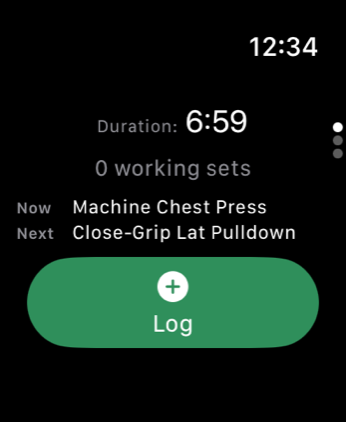
Apple Watch shows what you are on now and what is next, moves the session to a different exercise without your phone leaving your pocket, logs sets with that phone locked, and taps you when rest runs out. It talks only to your phone.
When the machine is taken
Someone is on the rack and you are not going to stand there waiting. Pick any other exercise, on your phone or on your watch, and the session comes with you. The ones you stepped over come back round at the end instead of disappearing. Log a set anywhere and it follows on its own, so most of the time you never touch the control at all.
Tell it what you can't do
Settings ▸ Exercises I can't do keeps a list — one exercise, or a whole family such as anything weighted that's a squat, with exceptions. Those stay out of the library, the pickers and every suggestion, and each place says how many it is holding back so you can show them anyway. You write the rule; the app never guesses one.
Your history, as a spreadsheet
Settings ▸ Export workout history writes every set, block and cardio segment to CSV — in kilograms, seconds and metres — and hands the files to the share sheet. Open them in Numbers, Excel or Sheets, keep them as a backup, or do your own arithmetic on them. It is the one route by which your training leaves the phone, and you are the one who takes it.
The advisor
Suggestions, not orders
Progression advice is transparent, rules-based logic — no AI, no black box. When your weight×reps work is ready to move, the app suggests the next step and shows its reasoning. You accept, dismiss, or override. Every time.
And it is deliberately silent on rehab, duration and reps-only work: no confident bad advice for a recovering body. Weeks without progress earn a cautious deload suggestion, not a pep talk.
The app says the same thing in Settings ▸ About and on every exercise's history: this is training guidance read off your own logged sets — not medical advice, and no substitute for a clinician who knows your injury.
Progression suggestion
Goblet squat — working sets
Top of the rep range reached in each of your last two sessions.
What a suggestion looks like — advisory only, and nothing changes until you say so.
Privacy
Private by architecture
Not a policy promise — a structural fact. The app has no way to send your data anywhere, and that is enforced by automated checks on every change.
On your device, full stop
Every workout, routine and setting lives in a private database on your phone. No account, no server, no sync. Deleting the app deletes the data — there is nothing to delete anywhere else.
Zero network connections
The app makes none. Not for analytics, not for crash reporting, not for anything — there are no third-party SDKs to phone home. Your training cannot leave your device by itself; the only way out is the CSV export you ask for and share yourself.
Encrypted at rest
The database is protected with iOS Data Protection — sealed whenever your device is locked. Apple Health access is opt-in and under your control: the energy a session matches is kept on-device like everything else, and the only write is a workout recorded by your own Apple Watch session.
The whole policy fits on one page — read it. This site keeps the same promise: no cookies, no analytics, no third-party requests.
One developer, zero servers
Hi — I'm Tertius. I built Grip & Balance for my own training, rebuilding strength around a back that needs looking after. I wanted honest records and careful advice, not hype — and an app that couldn't leak my training data, because it has nowhere to send it.
It's self-funded, has no growth team, and makes nothing from your data because it never sees any. If it's useful to you too, that's the whole business model.
Tertius Wessels Made in South Africa
Free on the App Store
Start logging tonight's session
iPhone, iPad and Apple Watch · iOS 17 or later · No account to create — open it and train.
Download on the App Store